
Req to cash in one system
Fill the req.
Bill the hours.
Get paid.
AtsIcloud is a desktop ATS built for US IT staffing companies. Requisitions, pipeline, placements, timesheets, invoicing and compliance are all in one app, and the AI handles the paperwork.
Book a demo. 20 minutes, no slides.
Showing: The numbers
Integrates with LinkedIn, Dice, Gmail, Outlook, Public Records, DocuSign, QuickBooks, WhatsApp, Supabase, Claude, ChatGPT, MCP.
- Modules
- 20Modules
- Places the AI is used
- 44Places the AI is used
- Assistant tools
- 16Assistant tools
- Roadmap steps per req
- 14Roadmap steps per req
- Click paths in the Cheat Sheet
- 81Click paths in the Cheat Sheet
Meet AtsIcloud
The staffing OS for
US IT firms.
Every requisition, every consultant and every invoice, in one desktop app your team can learn in a day.
On your desk
A desktop app, not another browser tab.
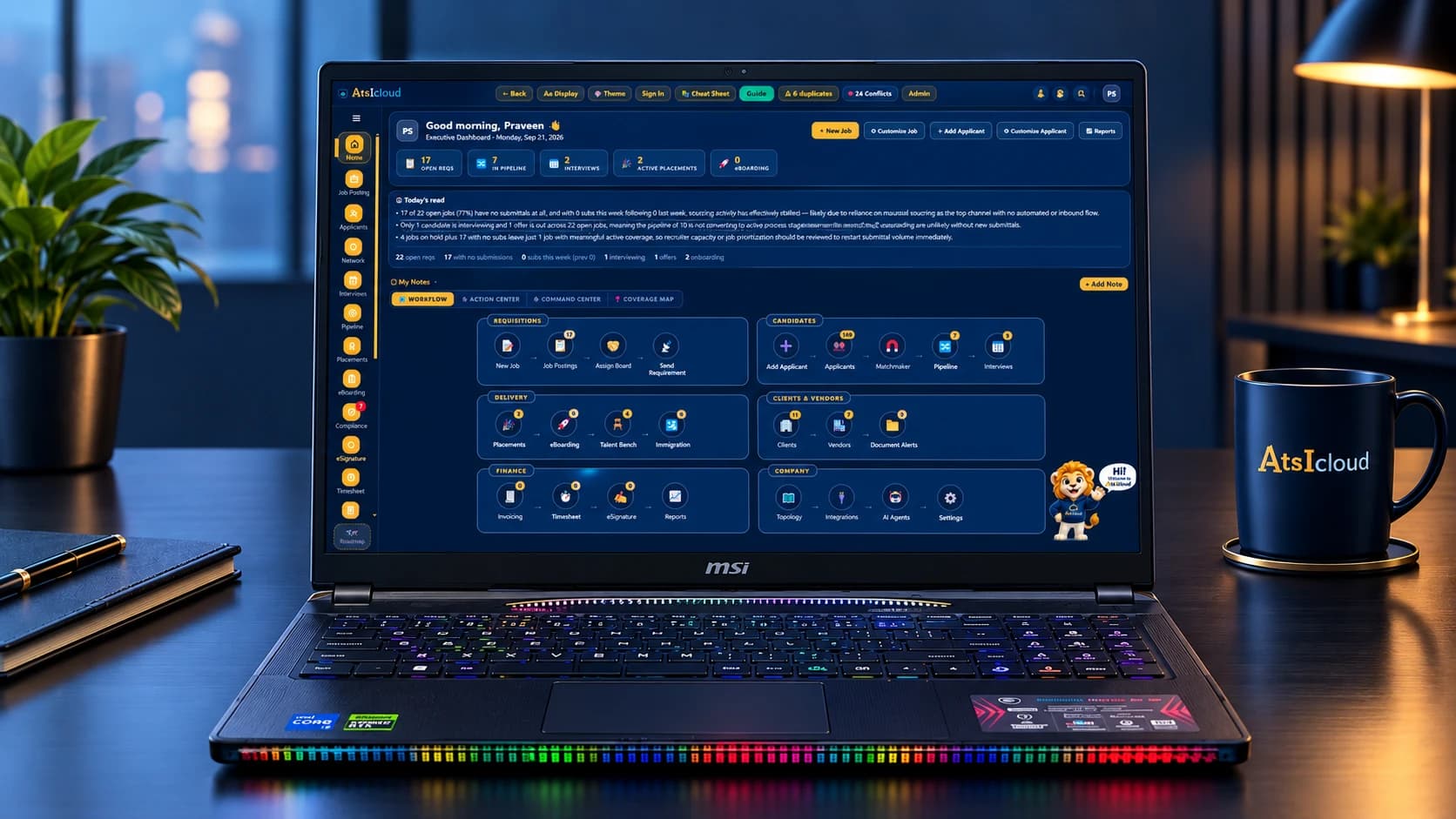
It installs on Windows and Mac and keeps its own copy of your data, so it stays quick with a full database open and keeps working when the office internet does not.
- Workflowevery module as a tile
- Action Centerwhat needs you today
- Command Centerthe numbers
- Coverage Mapwhere the work is
Home opens on these four. Everything else is one click down the rail on the left.
The shape of the app
Twenty modules, organised around five questions.
Win the work
- Job Posting
- Clients
- Inbox
Find the people
- Applicants
- CrossBoard
- Sourcing
- Network
Run the process
- Pipeline
- Interviews
- Documents
- Compliance
Start them
- Placements
- eBoarding
- eSignature
- Immigration
Get paid
- Timesheet
- Invoicing
- Reports
The AI Gateway, Integrations, Team Chat, Admin and the Chrome extension sit around these five.
What it does
Recruiting
From JD to shortlist in one afternoon.
Requisitions in six views, a 14-step sourcing plan for every role, seven boolean searches with the reason for each one, and a pipeline that blocks a stage move if it would break a rule.
Job Posting has six views: List, Board, Assign Board, Topology, Explorer and Clients. The strip along the top shows reqs with no submissions, approvals waiting and SLA breaches. Sort the list by health and the req with the biggest gap comes to the top.
Each requisition has a 14-step Roadmap in 8 phases. Step one is the kickoff brief, 29 questions in six blocks, pre-filled from the JD. Targets scale with the number of openings, steps tick off as the work happens, and you can export the plan as a PDF to hand to the client.
The Search Set writes seven boolean strings for each role, for example the core stack, the client's job title and the titles people actually use, and explains why each one is there. Work authorisation is never put in a string. When you rate the sourced candidates, Calibrate re-ranks the next set based on who you rejected.
Each application is a card across eight stages. When you drag a card, the board records who moved it, from which stage, and when. If a move would break a submission rule, the board blocks it there and then.
Chrome extension
Works where your recruiters already are.

The extension is a companion to the desktop app, not a copy of it. There is no second database. It puts the app's JD intake, duplicate check, submission rules and mailbox onto Gmail, LinkedIn and Dice, so nothing gets typed twice.
The button sits on every message, so we tested it on the wrong ones too. Press it on a bounce notification and the toast says "AtsIcloud read this as not a job description, nothing queued". Press it on a vendor email with six openings and it queues six drafts.
Review AI drafts shows the confidence, 95% in this case, and what it read the email as. It lists the fields it could not find instead of guessing them. If the email says C2C in one place and W2 only in another, it flags the conflict rather than picking one. Nothing is saved until you press Create safe draft.
Pick the reqs by number, pick vendors or type email addresses, pick a template. The app builds the email with one block per job and sends it through the mailbox connected in the desktop app, with the same logging as the app's own Send Requirement dialog.
Ask from any tab and it searches your own database first, before any job board. You get the matches from candidates you already have, with the skills that matched each one. Where a field is blank it says so, for example "work auth not recorded".
Tick the reqs you want and each one gets its own LinkedIn post, written from that req's details: client, location, W2 or C2C, rate, and what the person will actually do. Insert into LinkedIn drops it into the composer. Regenerate works per post, so you can redo one without losing the others.
Praveen Sadineni
Senior Data Engineer · Spark, Airflow, dbt
Send requirement
RITS-September-1003 · Data Eng
- ✓Apex Talent
- ✓NorthBridge
- ✓Cognivo
- Sigma Staffing
Delivery & Finance
Placement to paid, without the spreadsheet.

Who is working, at what rate, until when, and what the margin is. When a placement starts it is added to Invoicing automatically, and you cannot bill until all the required onboarding documents are in.
A placement carries its bill rate, pay rate and margin from day one. $46 pay against $58 bill is a $12 margin; $62 against $78 is $16. The number in the report is the number on the contract. Ending Soon shows which renewals need a conversation this month.
Click a month cell, enter the hours, confirm, then Bill. Bill is blocked if any required onboarding document is missing for that consultant. Invoicing then tracks AR Aging, Collections and Analytics across nine tabs.
Home shows the numbers from every module, plus Today's read: two or three lines written from the live figures that point out, for example, which requisition has gone quiet. The quick-action rail lets you start a task from the tile itself.
Outstanding
$184k
DSO
42 days
Overdue 30+
$21k
Compliance & Immigration
Nobody starts without their paperwork.

One document vault for everything. A file collected at sourcing counts for onboarding too. Compliance reads the vault directly, so nothing is ticked by hand, and Immigration counts down from the I-797 uploaded at onboarding.
Group by recruiter and you will usually find the gaps are not spread evenly. Compliance reads the document vault directly, so the view always matches what is actually on file. The sidebar badge counts the open items, so you notice without opening the module.
Every document a person owes is kept in one place. Send upload link lets the candidate upload from a phone with no login, and the file goes into the right slot. A vendor's MSA and W-9 cover every consultant from that vendor.
Compare lays every field out across the copies and marks where only one copy has it, where neither does, and where they disagree. It tells you which copy to send and why, and scores each copy against the best-fit requisition, 57% against 43% in this example. It also lists what it has not compared yet and what that would cost.
eBoarding collects the onboarding pack from a placed consultant and chases whatever is missing. Immigration watches the expiry dates stored in the same vault and flags them at 90 and 30 days. eSignature sends documents for signature from inside the app using a link, with no account needed.
- Praveen SadineniH-1BOct 1431 days
- Sandhya SadineniI-9 re-verifyNov 0250 days
- Gagana SadineniBackground checkDec 20OK
- Surya SadineniW-4—Missing
- Chandra SadineniE-VerifySep 20Confirmed
AI
An AI recruiter on every desk.

AI is used in forty-four places in the app, not just in a chat box. Every call goes through one gateway where it is logged and costed, and the assistant has sixteen tools that work on your real data and run your real rules.
Anything that looks like a JD is classified and added to Review AI drafts. You can also paste a JD or drop in a .docx and get the fields back. Nothing becomes a requisition until someone presses Accept. Mail is linked to the req, candidate or vendor, so the Communications tab fills in by itself.
Sixteen tools over your live database: list_requisitions, find_candidates, check_submission, get_req_health, build_roadmap and the rest. Four agents share them, each tuned to the module you are in. Answers include atsicloud:// links that open the right screen and highlight the control.
Ask "can I submit this candidate to RITS-September-1003?" and it runs the real submission rules, then gives you the reason and the alternative. Ask "how do I assign an applicant?" and it answers from the app's own Cheat Sheet, so the steps match the buttons on your screen.
If a provider returns an auth error, hits a rate limit or times out, the call moves to the next provider instead of failing. AI Subscriptions lets you sign in to Claude, ChatGPT or Grok, so there is no API key to leak or rotate. The Playground lets you test a provider, and the Request Log shows every call, who made it and what for.
From: Pradeep@rits-it.com
Fwd: OPTUM needs a Sr Data Engineer, Charlotte
Draft requisition
94% confident- Title
- Senior Data Engineer
- Client
- OPTUM
- Location
- Charlotte, NC · Hybrid
- Rate band
- $85–95 /hr
Reports
The reports you need for the Monday meeting.

Time-to-fill, recruiter conversion and source effectiveness, plus an insights panel on almost every module with Key takeaways written from the numbers. Everything exports to CSV, Excel and PDF.
Home puts the whole desk on one screen. Today's read is written from the current figures, not from a template, and it will name the requisition that has gone quiet. Behind it are four views: Command Center, Action Center, Workflow and Coverage Map.
Coverage Map puts every open requisition on the city it is for and shades each state by how many candidates you already have there. The circle grows with the openings and changes colour when nobody has been submitted yet. Filter by client, work authorisation or stage and it redraws.
Command Center is the first of the four views. Active jobs, the pool, who is in a pipeline and what the month has done, then a conversion funnel that only shows a percentage where the comparison means something. Under it, two or three lines written from those numbers and one action for the week.
Open Pool Insights from Applicants and press Key takeaways. It makes one AI call and caches the result, so reopening the panel costs nothing. The time-to-fill, recruiter conversion and source effectiveness reports export to CSV, Excel and PDF.
Network holds the other side of the desk. If a consultant's vendor record is not linked, their profile shows a flag, because the MSA and W-9 cannot be reused without it. Vendor documents are collected once and cover every consultant from that vendor.
Open reqs
38
+4
Submissions
127
+18%
Placements
11
+3
Gross margin
31.4%
+0.8
Key takeaways
- ▸ Submissions up 18% on Q2; interview conversion flat at 24%.
- ▸ Margin recovered on renewals — three placements re-rated.
- ▸ Whataburger DSO slipped to 51 days; two invoices 30+.
Command Center
The Monday meeting, already answered.
Home opens on this. Every counter is the live database, not a report someone ran on Friday, and the lines under the funnel are written from the same numbers you are looking at.
Active jobs, the size of the pool and how many people are actually in a pipeline, beside what the month has done: submitted, interviewing, offers out, placements.
Each stage shows the count, and a percentage only where the comparison means something. Click a bar and the Pipeline opens filtered to it.
Underneath, two or three observations written from these numbers and one thing to do this week. It names the reqs, so nobody has to go looking.
Command Center
Full organization view, Job Posting through to Placement
Right now, and this month
Active jobs
31
Applicants
149
In pipeline
7
Submitted
7
Placements
1
Conversion funnel
Where this range's submissions went. A percentage only where the word means something.
- In pipelinethe pool being worked
- Submitted100% of in pipeline
- Interviewing29% of submitted
- Offer stage100% of interviewing
- Placed50% of offer stage
Takeaway. Two of seven submissions reached an interview. What goes out is the weak step, not what happens after.
Coverage map
And the same desk, on one map.
The second of those views puts your open requisitions and your own candidate database on one picture of the country. Filter by client, work authorisation or stage and it redraws.
Every open requisition sits on the city it is for, and the circle grows with the number of openings. Five openings in Austin are obvious from across the room.
The shading is your own database. A dark state means you already have people there. A pale one means that role starts from nothing, which is worth knowing before you promise a date.
Circle colour is submission coverage. Red means nobody has gone in yet, gold means the list is thin, teal means the client has enough to look at.
And everything around it
Everything else you need is built in.
Eight more pieces that most teams end up buying separately, or doing by hand. They are in the same app, on the same data.
Channels shared with your team and the AI agents. There is a general channel plus one for each requisition.
Forty admin panels on one page. Every business rule is changed here, not in code.
Press ? on any screen to see every page, toolbar and tab with the clicks to get there. There are 81 of them.
Templates, a field designer, sequential or parallel signing, and a signing link that works on a phone.
Other AI tools can query the ATS directly, including whether a candidate can be submitted and, if not, why.
Connectors with live status, API keys and webhooks, and a one-time pairing for the Chrome extension.
Sixteen roles and an org chart that drives approval routing. Sign in as another user to see the difference.
SQLite on the desktop, synced to the cloud when you are online. The app keeps working if the network drops.
Open roles
Synced from AtsIcloudSenior Data Engineer
Charlotte, NC · Hybrid
$85–95/hrApplyPlatform Engineer
Remote (US)
$80–90/hrApplyQA Automation Lead
Rock Hill, SC
$70–78/hrApply

Twenty minutes, no slides
See your own reqs in it.
Bring a job description and a vendor list to the demo and we will set them up live while you watch.
Book a 20-minute demo